1. Add people to your friend's list
There's several ways to do this:
• Select email, right click, select 'Friend's List' then 'Add Sender'.
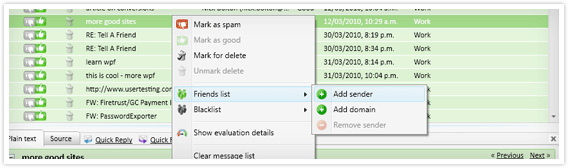
• Highlight the email and press the + button on your keyboard.
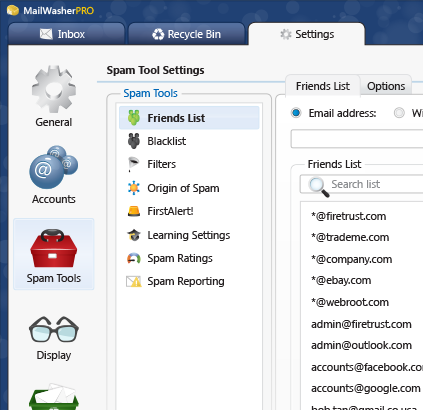
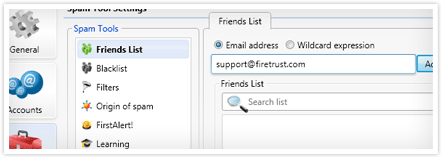
• Manually add an email address from the spam tools settings.
2. Mark and delete multiple emails at once
To mark many messages for deletion, click on a message and then while holding down the SHIFT key (for groups of emails) or CTRL (for individual emails) click another email. This will select more than one email at a time. Right click in the message table and select 'Mark for deletion' or press the letter 'D' on the keyboard, or click the delete check box at the top of the delete column.
3. How to auto-delete unwanted email
Sometimes you just don't want to hear from some people again, spammers or otherwise. Each spam tool in MailWasher has the ability to auto-delete email. (Settings » Spam Tools).
There's four ways to achieve this, the first being the easiest.
• In each Spam Tool options, you'll see an option to auto-delete. For example, in the Blacklist, go to the Options tab and select 'Auto delete blacklisted emails'. This will automatically delete any email if the sender is on your blacklist. This option also exists for other spam tools such as FirstAlert and Origin of Spam.
• Being specific about what emails you want auto deleted: You can set up a filter to mark certain emails or subject lines, or content to have a high spam score. When this score is exceeded, and you have turned on auto delete (Settings » Spam Tools » Spam Ratings), the email will be deleted automatically.
• Being general about what emails you want deleted, ie. all email addresses in the blacklist: Set the Blacklist to have a high spam rating (Settings » Spam Tools » Spam Ratings) and turn on auto delete for this high level.
• Alternatively, you could create a filter with the action to 'Auto Delete' based on certain criteria. See Advanced Features for more information about writing filters.
If you do find you're losing legitimate email, you can always search in the recycle bin and rescue it.
4. Train MailWasher to recognize spam
This should really go at the top because it's important! Spending a little time training MailWasher as you use it will reap big benefits in how it recognizes spam and good email.
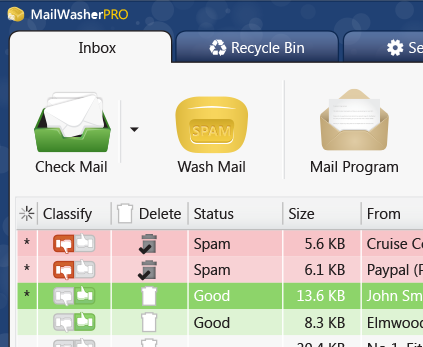
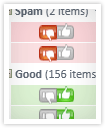
It's really easy. In the 'Classify' column, just mark each email you get as thumbs up (good) or thumbs down (spam), or click each again to make it neutral. After doing this a few times MailWasher will very accurately identify your incoming email so you don't have to.
5. Accidentally deleted a good email?
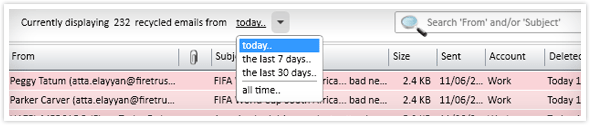
Click on the Recycle Bin tab and locate the email you want to retrieve, if you know the sender or subject, simply start typing it into the search box and the email should quickly display. Once located, select the email and click the 'Restore' button to send it back to your inbox.
Note: Emails that were deleted more than 24 hours ago will not initially display. To show older emails select the ‘today’ dropdown and change it to a week, month or all time.
6. Find out more useful information about the email you receive
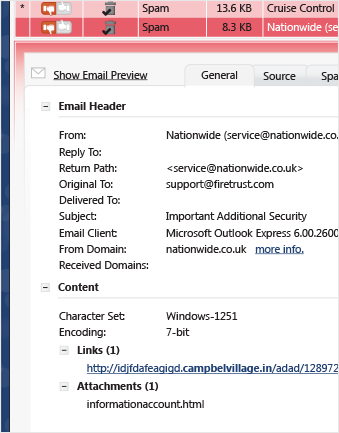
In the preview pane, click on the 'Show Email Info' link. This will show you the following information.
• General Info - About the sender such as who they are, what email program they used to send the email to you, links and attachments in the email and the language.
• Source - This is the raw source of the email
• Spam tools - More in depth information about how the spam tools evaluated the email
7. Search emails
If you're looking for that lost email, click on 'Search Inbox' (or Search Recycle Bin if you're in the Recycle Bin) and enter a few keywords which would have been in the subject line or email address. Your lost email will quickly be displayed. You can also look at all the email which h aspassed through MailWasher by checking the box 'Show all email logged'.
If you've received many emails with the same subject and want to delete them easily, just search for them say by sender or subject line. All of those emails will be displayed and you can quickly mark them for delete (holding SHIFT key plus click delete to select blocks of email).
8. How to hide emails
Hiding emails is useful if you want to make other emails stand out. For example you might want to hide emails from friend's so the spam is more visible, thus making it easier to deal with.
For example, to hide emails from Friend's, go to Spam Tools » Friend's List, then the options tab, and select 'Hide Emails'. When you next check your email, emails from friend's will be hidden so the spam sticks out. You'll notice an envelope icon at the bottom of the screen with a number. This shows you how many friend's emails are hidden and you can click it to show or hide the friend's emails.
9. Text too small? Buttons too large?
You can enlarge the text in MailWasher.
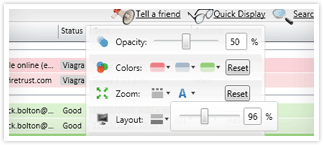
Go to Display Options » Zoom, and select the 'A' icon to display the text zoom slider.
If the buttons are too large, Go to Display Options » Zoom, and select the icon with the 3 dots to display the button zoom slider.
10. Want to change the layout?
Go to Quick Display > Layout and have fun with the various combinations of layouts available.
11. Grouping
Grouping is a nifty way of sorting your emails by relevance. For example you could sort all your emails in to spam, good and undetermined groups, making it easy to display and manage them.
To group by a column simply right click on the column header and select 'Group by', your emails will be sorted by that group.
Eg. Group by Classify and now you have all your emails in spam, undetermined and good groups. You can expand and collapse these groups to make everything more readable.
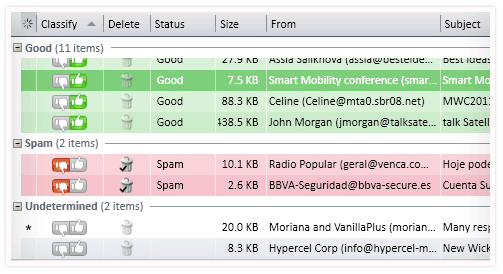
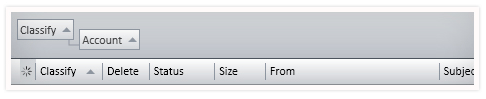
Another way to group emails is to go to Quick Display » and check 'Show grouping bar'. A grouping bar is shown above the column headers. This lets you group by more than one column and all you need to do is drag and drop each column in there to group by it.
12. How do I sort by multiple columns?
You can make MailWasher sort by multiple columns, so for example - sort by SENT, then by FROM columns. Just click the SENT column first and then hold the SHIFT key on your keyboard and mouse click the FROM column. Now emails will be sorted in order of precedence by the SENT column first, then the FROM column.
13. In Windows 7, how do I make the MailWasher icon stay visible in the system tray?
Go to the system tray and click the arrow. This will show a box with your icons displayed, click the 'customize' link at the bottom. A window appears which lets you choose how notifications appear. Locate MailWasherPro and change the selection to 'Show icon and notification'. Click the OK button.
14. Unsure about why your email was marked as spam or good?
You can quickly see which filters were used to evaluate the email. Click on the spam side bar and click the 'Evaluation' button. You'll see at a glance which spam tools were used and the score they gave. Each spam tool gives you the option of changing the score to suit your needs, in the (Settings » Spam Tools » Spam Ratings) area.
Click here to learn how MailWashers spam tools work and how you can adjust them to your liking.
15. Prevent accidental deletion of good email
Some times you may have email out of view (meaning you need to scroll down to see them) which are marked for delete. If you don't inspect these out of view emails, by pressing the WASH MAIL button you may accidentally delete good emails.
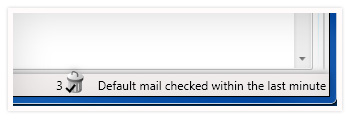
To help prevent this, MailWasher includes a 'Marked for Delete' counter at the bottom right of the screen. This shows how many emails are marked for delete, even if they are off screen.
16. Get more of your email from the recycle bin
MailWasher by default only downloads the first 50 lines of an email. This is to ensure speedy checking, but when you want to restore an email from the recycle bin, only the first 50 lines will be rescued. So you may find attachments are lost. You can tell MailWasher to download more of the email when checking in the Settings » General » Spam Throttle. Just move the slider along until you get the desired amount of lines to download.
17. Where did that email really come from?
If you're unsure about the legitimacy of an email, in the preview pane, click on the 'Source' tab and you'll see all sorts of information about where the email came from. Most of it is quite technical but you'll usually come across something which might tell you that the email is, or is not legitimate.
18. How do I auto-delete every email, except only from those people on my friend's list?
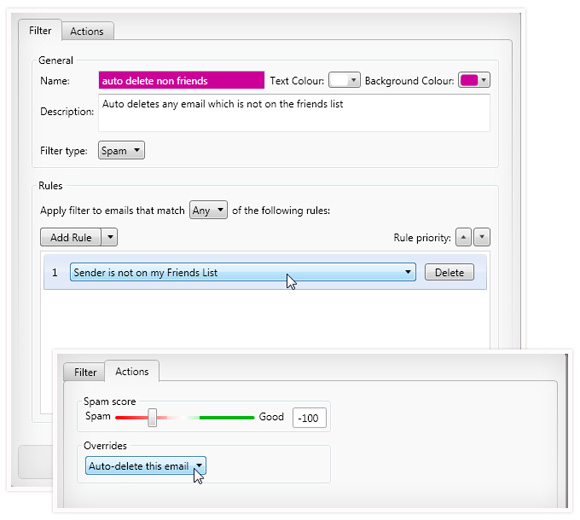
Some people only want email from users on their friend's list, and to delete everything else automatically. We can use a filter to achieve this. Go to Settings >> Spam Tools >> Filters and 'Add Filter'. Then add a filter like so. Next click on the 'Action' tab and set it to auto-delete. You may want to only mark emails first just to check it's working as you expect, then when you feel confident it's marking the correct emails, set it to auto-delete.
19. Help, I keep getting the same emails downloaded in to MailWasher, even though I downloaded them to my computer
Sometimes it may look like messages are stuck in MailWasher after downloading your emails to your email program. Most of the time you can simply press the 'Check Mail' button to clear the screen, but if this doesn't work, it's most likely you have your email program set to' leave messages on the server'.
To help you understand, your messages are not stuck in MailWasher as Mailwasher does not actually keep a copy of the mail, it just checks it on the server and downloads a portion of the message so you can then see if it is spam and decide to delete, or keep it. It is in fact, your email program which is giving the command to leave messages on the server, so when checking, MailWasher just downloads all those emails again since there's a copy on the server. You may have reasons for leaving this setting on, but if it's causing problems then follow these instructions about how to turn it off.
20. Filters/Tagging email
Filters allow you to make MailWasher Pro tag email as good, neutral or spam.
You can specify certain words or combinations of words that, if they appear in the Subject, Body, From and/or To fields of the email will trigger an automatic categorization of the email within MailWasher Pro. You can even tag emails so they display in MailWasher in a different color.
Filters can also be useful for identifying legitimate email. You may receive an email from a list via a company whose product and news you want to know about but this email might be ordinarily identified as spam. Using the filters function you are able to instruct MailWasher Pro that you want to receive this email.
Tip: If you want to block out a whole string of words, instead of trying to write a filter for each word, use regular expressions instead.
Regular expressions are powerful tools that make writing filters easier.
Let's say you wanted to be notified of the following words in an email:
free, money, casino, deal, credit and $
Instead of writing six separate filters - regular expressions let you put them on one line with a pipe separating them, like this:
"Body" "Contains" "RegEx" free|money|casino|deal|credit|$
See Advanced Features for more information about writing filters.
21. Keyboard Shortcuts
You can use keys instead of the mouse to navigate within MailWasher Pro.
[ARROW DOWN] Move down one message
[PAGE UP] Move up one page
[PAGE DOWN] Move down one page
[ESC] Exits preview
[DELETE] Marks for Delete
[D] Marks for Delete
[B] Marks for Bounce
[R] Marks for Report
[+] Adds to Friend's List
[-] Adds to Blacklist
[ENTER] Preview
[SPACE] Preview
[F5] Check Mail
[F6] Process mail
[C] Clear message list
[F7] Launch email application
[F8] Display Accounts window
[CTRL + [F6]] View Preview pane
[CTRL + [F7]] Show/Hide Friend's and Filter Sidebar
[CTRL + [A]] Select all
[CTRL + [S]] Show Settings window
[CTRL + [T]] Show/Hide Evaluation Sidebar
[CTRL + [Shift] + [M]] Maximise
22. Blacklist and Friendlist getting large?
The friend's list and blacklist have a quick search feature too. Just enter any part of an email address and those email addresses will quickly filter to the top.
23. Are you getting spam from your own email address?
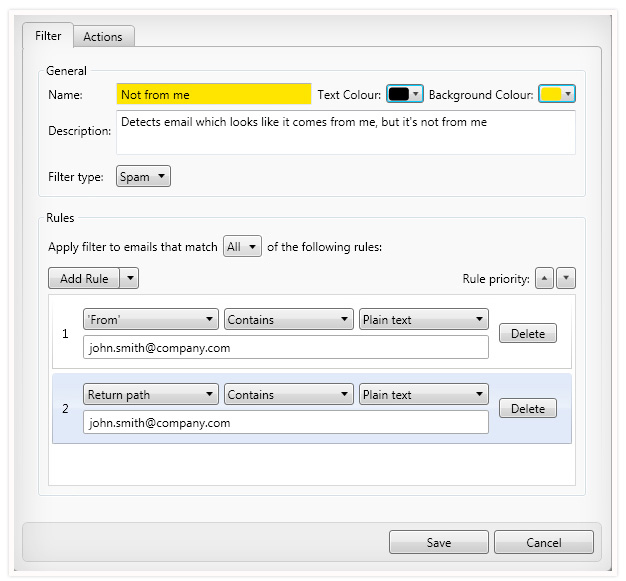
Are you sick of spam masquerading as though its from yourself? I think we've all received spam at some time which looks like it comes from ourselves. One of our users kindly sent in a filter to recognize this spam and so we'd like to share it with you.
Make your own filter by going to Settings » Spam Tools » Filters and then click Add Filter and make a filter like this (but make sure you use your own email address).
24. Think you are losing emails?
First you should check if the email came through Mailwasher Pro.
Have a look in the Mailwasher recycle bin. Each and every email which has been processed by Mailwasher is listed in the recycle bin, even if it was not deleted by Mailwasher. Essentially the recycle bin is like a log file of what Mailwasher was doing. In the Recycle Bin click the "Show All Email Logged' check box. Now look up the email in question in the Mailwasher recycle bin and check if it is displayed as deleted. If it is not displayed as deleted, then you can be sure it was not deleted by Mailwasher.
Quite often the source of the problem is another spam filter. To understand, I should explain how Mailwasher and your email program works together. Mailwasher checks for new email and cleans your inbox from spam and unwanted emails. Then your mail program starts and you have to click send/receive to download the emails. You see, Mailwasher does not send anything to your email program, but the email program downloads the remaining good emails from the mail server entirely by itself. Now here is where the culprit (other spam filter) sneaks in and redirects the email to a different folder than the usual inbox folder of your email program.
Outlook for example has its own spam filter and moves all email it evaluates as spam, into the Junk mail folder. Outlook Express doesn't use such a spam filter but there is an option to add addresses to a blocked sender list. Have a look and be sure none of the addresses is in Outlook Express » tools » message rules » blocked sender list.
There are many more programs out there which use a spam filter and unfortunately some of them do not do a good job. So if you suffer from lost email via spam filtration then remember to check, if there is another tool on your machine responsible for redirecting the good email into a different location. Sometimes it helps to search your computer for the subject line of the lost email because some spam filters don't even create another folder in your mail program, but instead keep the emails in a completely different location. You can find the subject line in the Mailwasher recycle bin.
HAVE A SPECIFIC QUESTION NOT ANSWERED HERE?
Check out the Support Page, or send our friendly support team an email with your question.